
Visit Japan Web 2026: How to Fill It Out Before You Land
Some travel links on The Standard Japan are affiliate links. If you book through one, we may earn a commission at no extra cost to you.

Visit Japan Web (VJW) is the official government portal that lets you fill out your immigration and customs declarations online before you fly, then show one QR code at immigration and customs instead of filling out paper forms on the plane or at the airport. It's free, takes about 15 minutes the first time, and works for both immigration and customs — you can do one or both depending on your citizenship and what you're bringing in.
Some links in this article are affiliate links. If you book through them, The Standard Japan may earn a commission at no additional cost to you.
Arrival stack (pair these)
Do these in order on arrival day — each guide links the next:
- Visit Japan Web (this page) — immigration/customs QR before you land
- Narita vs Haneda — which airport and how into the city
- Best eSIM for Japan · eSIM vs pocket WiFi · eSIM setup — data on landing; install Airalo or Saily before you fly
- Suica / Pasmo · Mobile Suica on iPhone — trains, buses, konbini taps
What Visit Japan Web Actually Does
Japan used to require two paper forms on arrival: a disembarkation card (immigration) and a customs declaration. Visit Japan Web replaces both with one online registration. Since 25 January 2024 it produces a single QR code that covers both immigration and customs; the separate immigration and customs codes it used to issue no longer work.
Step 1: Create Your Account
Go to vjw.digital.go.jp, the only official address, and create an account with your email. You'll get a verification code — confirm it and you're in. This part takes two minutes and can be done weeks before your trip.
Check the address before you type anything. The Digital Agency has warned about a copycat site that charges an "application fee" (the real service is free) and fake "Visit Japan Web" apps (there is no official app; it runs in your phone's browser). In May 2026 Japan Customs warned that overseas "application agency" services were also charging travellers to fill in the declaration or "create" the QR code. Customs charges nothing for it.
Step 2: Register Your Passport and Personal Details
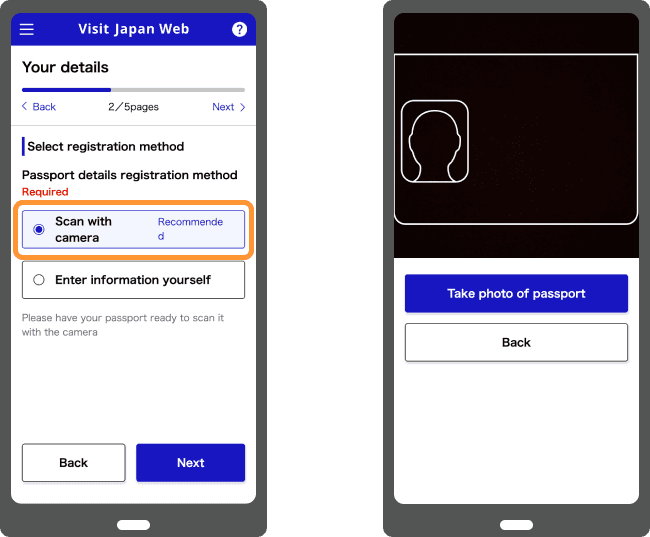
Add a "user" (yourself, and each travel companion if registering family together). For the passport you can choose Scan with camera, which reads the photo page and fills in your name, number, nationality and date of birth, or Enter information yourself if the scan keeps failing. Either way, check every field against the passport itself. If your passport expires within six months, the site shows a warning.
Step 3: Register Your Trip
Add your flight details — arrival date, flight number, and where you're staying in Japan (your first hotel or accommodation address is enough, even if you're moving around later in the trip). If you applied for a Japanese visa, you can enter the visa issue number and the site pulls your details in. The official guide sets no submission cut-off, so this can be done any time before you fly.
Step 4: Fill Out the Immigration (Disembarkation) Form
Answer the standard questions — purpose of visit, length of stay, occupation, contact address in Japan. This is the same information the paper card asks for, just typed once online instead of by hand on a clipboard.
Step 5: Fill Out the Customs Declaration
Answer whether you're bringing in anything requiring declaration (large amounts of currency, commercial goods, restricted items). If you have nothing to declare, this takes under a minute.
Step 6: Get Your QR Code
Once you've completed both the immigration and customs sections, Visit Japan Web shows one QR code under "Immigration and Customs Declaration" on your home screen. If you registered companions, each person has their own code; pick the name from the drop-down under the QR.
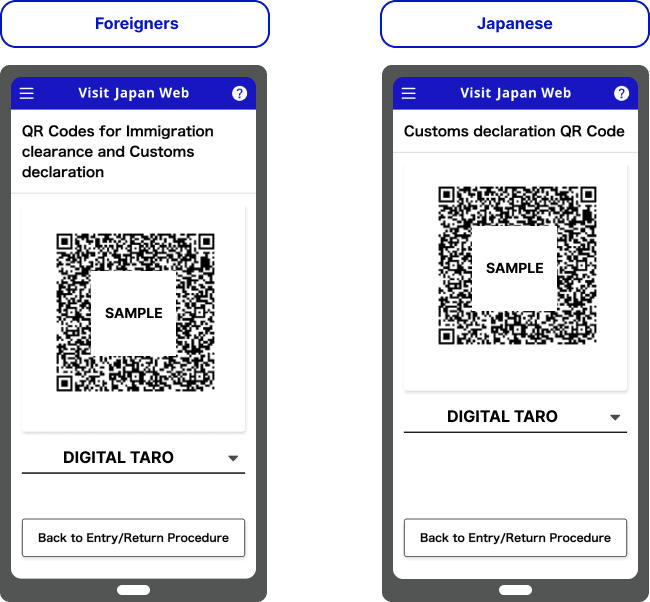
Screenshot it before you fly in case airport Wi-Fi is spotty. Better still, land with data already working: a Japan eSIM installed at home (Airalo or Saily) connects as soon as you switch your phone on after landing, so the QR, your hotel address and the train app all load in the immigration queue.
Check Japan plans on AiraloOpens Airalo in a new tabOptional travel connectivity. Check device compatibility, validity and activation conditions before buying. Visit Japan Web itself is free.
Using the QR Code at the Airport
At immigration, show the QR code and your passport at the counter, and have your fingerprints and photo taken as usual.
At customs, scan the same QR code at the electronic declaration terminal, then walk through the electronic gate if you have nothing to declare. If you do have something to declare, use the staffed counter. At Haneda, Fukuoka and Naha, the terminals are in the baggage hall, so you can do this while waiting at the carousel.
Joint kiosks read your passport and QR code once for both immigration and customs. According to Japan Customs, they are at:
| Airport | Terminal | Since |
|---|---|---|
| Kansai | Terminals 1 and 2 | 1 April 2025 |
| Haneda | Terminal 2 | 1 April 2025 |
| Narita | Terminal 3 | 7 April 2025 |
| Haneda | Terminal 3 | 16 April 2025 |
| Fukuoka | International terminal | 1 December 2025 (inside immigration), 1 April 2026 (arrivals flow area) |
Medium- and long-term residents of Japan can't use the joint kiosks. They go through the normal counters.
You still need your physical passport. The QR code doesn't replace passport control; it pre-fills the paperwork so the in-person steps go faster.
What You Can Bring In Without Declaring It
Step 5 asks whether you are carrying anything over the duty-free allowance. For an adult visitor, Japan Customs sets these limits:
Alcohol and tobacco allowances apply from age 20. Items of one kind worth ¥10,000 or less in total don't count toward the ¥200,000.
| Item | Allowance |
|---|---|
| Alcohol | 3 bottles (about 760ml each) |
| Cigarettes | 200 |
| Heated tobacco | 10 packs (e.g. 200 IQOS sticks) |
| Cigars | 50 |
| Perfume | 2 oz (about 56ml) |
| Everything else | Under ¥200,000 total overseas value |
Source: Japan Customs
Go over any of these, or carry cash and payment instruments worth more than ¥1 million, and you answer "yes" in Step 5 and use the staffed customs counter. (Japan Customs has the full rules.)
Two things are taken off you even if you declare them:
- Meat products. Jerky, sausages, ham and meat-filled buns can't come in from overseas, vacuum-packed or not and in any quantity. The Animal Quarantine Service uses detector dogs at arrivals, and the maximum penalty is three years in prison or a ¥3 million fine.
- Some ordinary medicines. Many Sudafed-type cold pills contain pseudoephedrine, which Japan treats as a stimulant ingredient. Adderall is banned outright. Prescription drugs are capped at a one-month supply unless you get an import permit. Our guide to bringing medicine to Japan explains how to check your exact drug.
You'll Use It Again When You Leave: Tax-Free Shopping
From 1 November 2026, Japan's tax-free shopping becomes a refund. You pay the full price including 10% tax, and the tax comes back after customs confirms at departure that you are taking the goods out of Japan. Visit Japan Web is involved at both ends:
- In the shop. Visit Japan Web can show a tax-free code that holds your passport details, which the shop scans instead of copying your passport. Shops don't have to accept it, so carry the passport anyway. You need ¥5,000 or more (before tax) at one shop on one day.
- At the airport. At Narita, Haneda, Kansai, Chubu, Fukuoka, New Chitose and Naha, you can do the customs check for your purchases online through Visit Japan Web on the dedicated airport Wi-Fi in the international departure lobby. The alternative is a tax refund kiosk. Either way it must be done before you check in your bags, within 90 days of purchase, and you can't take your bags back out of check-in to do it. If customs wants to see the goods, it sends you to the inspection area.
The shop or its refund company pays the money back, not customs, by the method you chose when you bought: bank transfer, credit card, an app or cash at the airport. Our tax-free shopping guide covers the new system in full. (Japan Tourism Agency)
Common Mistakes
- Registering too close to departure and not saving the QR code offline. Do this a few days ahead, not while boarding.
- Typos in passport details. Double-check spelling and passport number against the actual document — mismatches can bounce you back to the manual line.
- Using a copycat site. If a site asks for a fee or tells you to download an app, it isn't Visit Japan Web. The real address is vjw.digital.go.jp.
- Forgetting to finish both sections. The QR code only appears once both the immigration and customs sections are complete.
- Assuming it replaces your passport. Bring the physical passport regardless — immigration officers still check it.
- Not updating a changed trip. If your flight changes or you renew your passport after registering, edit the trip or passport details in Visit Japan Web before you fly so the QR code matches what you show at the counter.
Do You Actually Need It?
It's optional — you can still fill out paper forms on arrival. But given it's free, takes 15 minutes, and meaningfully shortens the immigration and customs lines (especially at Narita and Haneda during peak arrival windows), there's little reason to skip it. It pairs well with getting your IC card and eSIM sorted before you fly — all three are "do it once at home, save time at the airport" moves.
Apps to Install While You're at It
You'll be on your phone setting up Visit Japan Web anyway, so install these at the same time. They are the ones you'll open on day one:
| App | What you use it for | Our guide |
|---|---|---|
| Google Maps | Train routes with platform numbers, walking, opening hours. Download offline maps for your first neighbourhood | Japan travel apps |
| Google Translate | Point the camera at menus, signs and ticket machines | Japan travel apps |
| Suica or PASMO in Apple Wallet | Tap through train gates, buses and konbini tills. Works on iPhone 8 or later | Mobile Suica setup |
| Welcome Suica Mobile | JR East's iPhone app for visitors: no deposit, valid 180 days, topped up with Apple Pay | Suica vs PASMO |
| SmartEX | Book Tokyo–Kyoto–Osaka shinkansen seats in English | Buying shinkansen tickets |
| Tabelog | Japan's own restaurant ratings. A 3.5 is very good here | Japanese food guide |
| GO | Call a licensed taxi and pay in the app | — |
On Android, phone Suica and PASMO only work on phones sold in Japan. Buy a Welcome Suica or Tourist PASMO card at the airport instead. Taxi apps and some others send a sign-up code by text message, so register while your home SIM is still in the phone. The full list, with backups for when Google Maps gets a route wrong, is in our Japan travel apps guide.
FAQ
Is Visit Japan Web mandatory? No, it's optional. Paper immigration and customs forms are still available on arrival, but Visit Japan Web is faster and free.
How far in advance should I fill out Visit Japan Web? Any time before your flight — there's no early-submission penalty. Doing it a few days ahead, with time to fix any passport detail errors, is safer than doing it at the gate.
Can I register my whole family on one Visit Japan Web account? Yes. Add each family member as a separate "user" under one account, and you can manage everyone's forms and QR codes from a single login. Each traveler still gets their own QR code.
Does Visit Japan Web replace my passport at immigration? No. You still present your physical passport — the QR code pre-fills your paperwork and speeds up the in-person process, it doesn't remove the passport check.
What if I don't have WiFi at the airport when I land? Screenshot your QR code before you fly so it's accessible offline. This is the standard workaround and avoids any dependency on airport WiFi working.
Is there a Visit Japan Web app? No. It runs in your phone's browser at vjw.digital.go.jp. The Digital Agency has warned that apps using the name are not official and should be uninstalled.
Does Visit Japan Web cost anything? No. It's free. The Digital Agency has warned about a copycat site that charges an application fee; the government never asks for one.
Can I scan my passport, or do I have to type it in? Either. "Scan with camera" reads the photo page and fills in the fields; "Enter information yourself" is there if the scan fails.
Can I use Visit Japan Web for tax-free shopping? Yes. In the shop it can show a code with your passport details, and from 1 November 2026 you can do the departure customs check for your tax-free purchases through it at seven major airports, before you check your bags.
Is Visit Japan Web the same as JESTA? No. JESTA is Japan's planned electronic travel authorisation for visa-exempt visitors, similar to the US ESTA. The law creating it passed in 2026, and it is due to start in Japan's fiscal year 2028 (April 2028 to March 2029). The start date and fee haven't been announced. Until then, Visit Japan Web is all you fill in online.
Did this guide help you plan?
Responses are collected through analytics. For factual corrections, contact the editors.
Travel Desk
The Standard Japan
Trip planning: seasons and crowds, getting around, airports, where to stay, and the practical steps before and after you land.
Facts are taken from primary sources (operators, venues, official tourism and government pages) and dates and prices are checked on the day of writing. Pages are revised when those sources change.
Expertise
Seasonal crowds, transport and airports, itineraries, lodging, pre-trip logistics
Have a question or a correction?
Ask us anything about Visit Japan Web 2026: How to Fill It Out Before You Land, or tell us what we got wrong. We reply within 24 to 48 hours.
Related Stories

Mobile Suica on iPhone: Add It to Apple Pay Before You Fly
Mobile Suica works in Apple Wallet on any iPhone, but foreign Apple IDs hit a region-lock error. The fix, plus what Android users need to know.
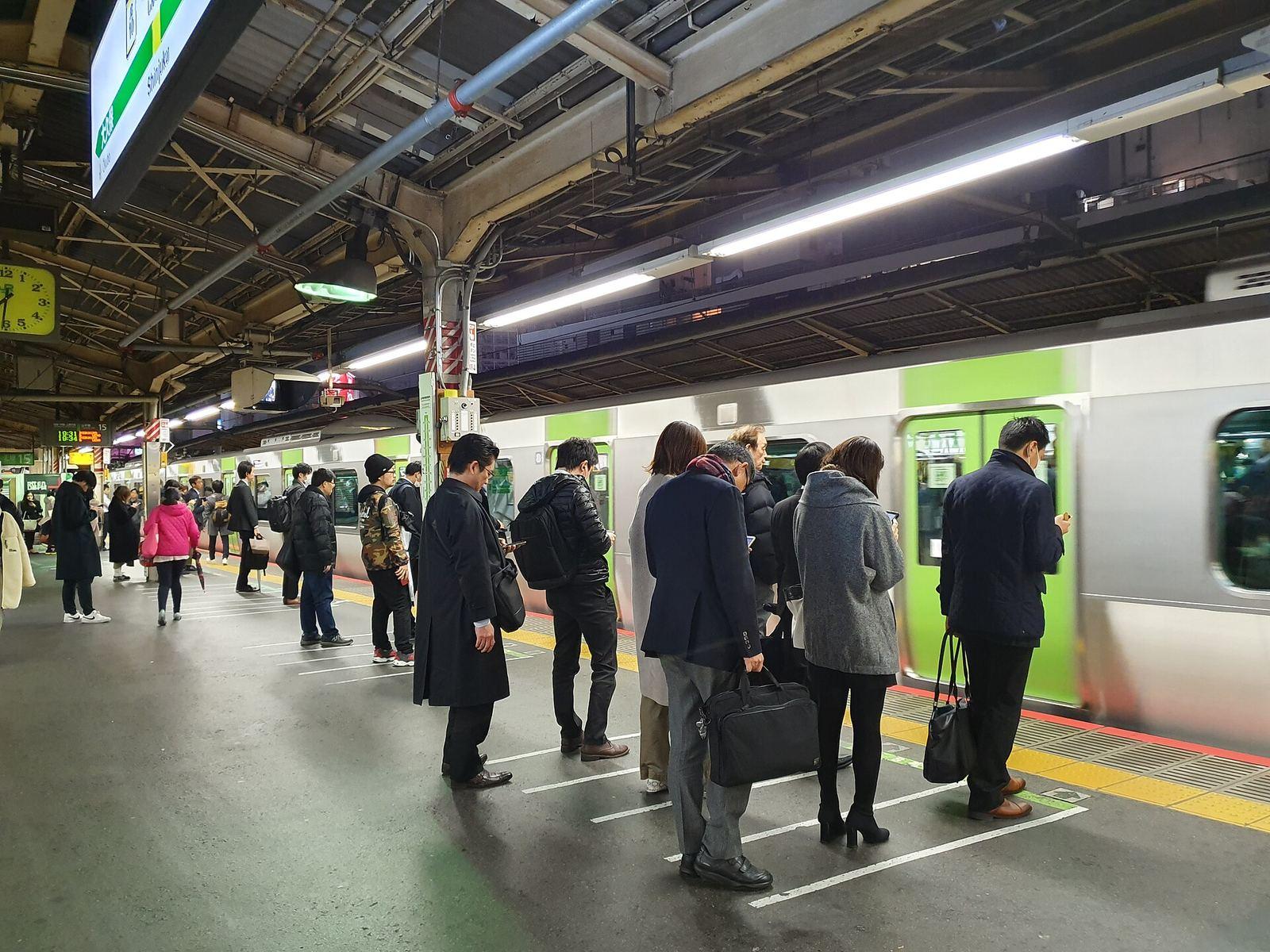
Japan Etiquette Rules: What You Must Know Before You Go (2026)
Japan etiquette rules are not complicated — but breaking them signals disrespect, not ignorance. Here are the ones that actually matter, explained clearly.

Buying the JR Pass Online: How Pickup Works in 2026
Buy the JR Pass online, scan the emailed QR code and your passport at a ticket machine, and collect a paper pass for the gates. Prices, pickup, Nozomi.